
Third-party game · Independent guide
Mottle Game
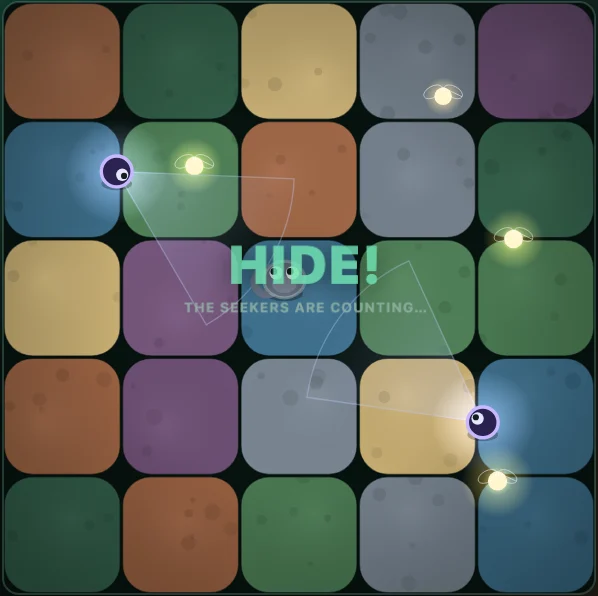
Drag to move, then release to blend into the garden before Seekers spot you.
- Drag to move
- Release to blend
- Collect fireflies
- Esc to pause when the game has focus
The basics of Mottle Game
Read the full guideMove in short bursts
Select Play Mottle, then follow the Tap to Play prompt. Wait for They Seek, then drag with a finger or mouse. On a keyboard, use the arrow keys or W, A, S and D.
Stop to blend in
Release your input to stop. The chameleon takes on the color of the tile beneath it. Watch the Camo meter before crossing another tile.
Collect and survive
Take a firefly when a Seeker faces away. Give yourself time to hide again and stay alive until the timer runs out.
Camouflage in Mottle Game
In Mottle Game, you guide a chameleon through a garden patrolled by Seekers. Moving gives you a chance to score, while standing still lets you blend into the tile. The time between releasing your input and regaining camouflage matters when a Seeker turns toward you.
- Creator
- Star Lord
- Genre
- Stealth and survival
- Controls
- Touch, mouse, and keyboard
- Original game
- 8x.gg
Mottle Game field notes
FAQGetting through your first round
Use the countdown to scan the board, then learn what to watch during the search.
Picking a route to a firefly
Compare two paths and see when it pays to leave the closer firefly alone.
Fireflies and round bonuses
See where points come from and how two fireflies turn a first-round clear into 120 points.
Keyboard controls for Mottle Game
Click inside the playfield to start and give it keyboard focus. Once the round is underway, use the arrow keys or W, A, S and D to move. Lift all direction keys to stop and begin blending in. If an arrow key scrolls the page, click back inside the game before your next move.
From the countdown to the first search
The first round of Mottle Game opens with three seconds of countdown. This is time to look. Find your chameleon, the nearest Seeker, and a firefly you could reach in a short trip. When the search begins, you have 13 seconds of game time to survive. The round clears when the timer reaches zero.
In later Mottle Game rounds, the Seekers have more time to search. Their movement and wider sight ranges can put several cones across the same route. A firefly you would have gone for in round one may be worth skipping until the cones move apart.
Reading the Mottle Game playfield
The eyes are Seekers. Follow the cone extending from the nearest eye to see where it is looking and which tiles it is about to sweep. The glowing fireflies are the items you can collect. A short path across the cone can be more exposed than a longer path along its edge.
Glance at Camo when you release your input. The meter shows how well the chameleon blends with its current tile. Alert measures how close you are to losing a life. Give Camo time to recover after moving. If a Seeker has already spotted you, wait for Alert to start falling before heading out again.
Staying out of a Seeker’s sight
An exposed chameleon builds Alert while it is in a Seeker’s sight. Entering a cone is especially risky right after a dash, when you are still easy to see. Release early enough to blend before the next sweep reaches your tile. If the cone is already turning toward you, let that opening pass and watch where it goes next.
Fireflies and clear bonuses in Mottle Game
Each firefly adds 10 points to your score. Surviving the seek timer awards 100 points multiplied by the round number. Even if you spend the round hidden on one tile, clearing it still earns the full round bonus. A firefly is worth moving for when you have time to reach it and regain camouflage.
Choosing a route in Mottle Game
Say two fireflies appear on either side of your chameleon. The closer one lies in the direction a Seeker is turning. The other is a little farther away, and the cone is moving away from it. Take the second route if you can reach it and stop before the Seeker sweeps back. If both paths are exposed, stay hidden and watch for a new opening.
A practice run for your first Mottle Game round
Try spending one opening round still and watching the nearest cone. Clearing it earns 100 points and gives you a chance to see where a short trip might fit. Start a fresh run and pick one firefly that you can reach while the Seeker faces away. After you collect it, release and watch Camo recover before you look for a second opening. If you bring in two fireflies and clear round one, your score is 120.
Getting caught and trying again
You start a Mottle Game run with three lives. At 100% Alert you lose one. With a life left, you get another countdown and retry the same round. After the last life, the results show your score and best score. Choose Play for a fresh run.
On the next attempt, use the countdown to think through the move that exposed you. If you dragged across a cone, pick a different route. If you were seen on the same tile shortly after moving, try releasing earlier to give your chameleon extra time to blend.
Pausing a Mottle Game run
Open Pause inside the player. On a keyboard you can press P or Escape while the game has focus. Choose Resume to pick up the same round. Keep the player open while you are away. Close game on DleZone removes the player, and opening the game separately on 8x.gg starts a new run.
Questions about Mottle Game
Is this the official Mottle website?
No. This page is DleZone’s independent guide to Mottle Game. Star Lord created Mottle — Hide & Seek, and 8x.gg hosts it. We embed the original share player. Visit the Mottle listing on 8x.gg for the creator credit and platform page.
Can I play Mottle Game on my phone without an APK?
Yes. Open this page in your phone’s browser and use the player above. There is no APK to install for the web version.
Can I open the game without a DleZone account?
Yes. DleZone guests can open the Mottle Game player without signing in. If 8x.gg displays an access prompt, follow the instructions on the platform’s page.
What if Mottle Game stays blank?
Reload this page and select Play Mottle again. If the player still shows a blank screen or does not accept input, open the original game page on 8x.gg in its own tab.
Is Mottle Game a daily challenge?
You can play again whenever you like. A new run starts from round one with a freshly generated board. There is no daily attempt limit in this version.
Can I mute Mottle Game while I play?
Yes. Select the speaker icon inside the player. Muting the game does not pause the seek timer, and you can turn the sound back on using the same button.
Does my DleZone account save my Mottle Game score?
DleZone does not record or sync Mottle scores. Any records the game keeps are managed by its own player. See how embedded games handle requests.